
Earlier this year, the Linux Mint project announced a significant shift in how it shipped releases, hinting at a longer cycle.
Project lead Clement Lefebvre had pointed out that the existing pattern of a new release every six months, on top of maintaining LMDE, was leaving the team spending more time on testing and release management than on actual development.
By March 2026, a decision had been made, with Linux Mint 23 now targeted for a Christmas 2026 release, making it the longest gap between major releases the project has seen.
The next release will be based on Ubuntu 26.04 LTS, will drop the long-used Ubiquity installer in favor of the live installer from LMDE, and ship with a functional Wayland session.
But the thing is, a longer wait works fine for existing users on a supported install. The problem is anyone trying to install Mint on very new hardware, where Linux 6.14 in the January ISO may not have the support they need.
To tackle that, the developers have introduced a new ISO that looks to improve compatibility with newer hardware.
What's happening?
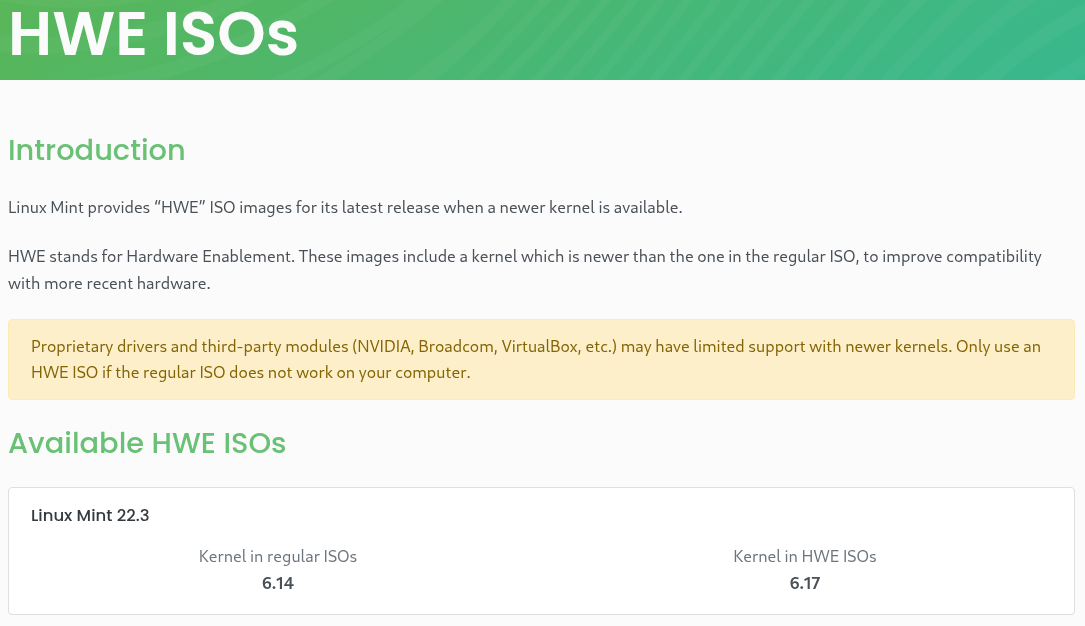
Linux Mint has published HWE ISO images for Linux Mint 22.3, where HWE stands for Hardware Enablement, and these are distinct from the regular Mint 22.3 ISOs. These ISOs ship with Linux kernel 6.17 instead of Linux 6.14 the original images came with.
Don't think that these are new releases; rather, the HWE bit ensures that you get support for newer hardware, while the underlying system remains Linux Mint 22.3 in every way, fully put through the Mint team's QA process.
The team also plans to keep this up, publishing fresh HWE ISOs each time a newer kernel lands in the package base. So the waiting period until Mint 23 in December should not leave new hardware users without a compatible release.
For context on how kernels work in the 22.x series: the LTS kernel at 6.8 is what Mint 22 and 22.1 came with, while Mint 22.2 and 22.3 moved to the HWE track, starting at 6.14 and now sitting at 6.17. Either way, both tracks get security updates and are actively looked after.
If you are already running an up-to-date Linux Mint 22.3 install, you are likely already on kernel 6.17 and do not need to touch the HWE ISO. The images are primarily useful at the installation stage, for machines where the regular ISO will not boot or install cleanly due to hardware compatibility concerns.
Who's this for?
Very new laptops and desktops with components that require a kernel newer than 6.14 will need the HWE ISOs. Of course, if the regular ISO works fine on your machine, then there is no reason to look at the HWE version.
There is also an important caveat worth flagging before you reach for one. The Linux Mint folks specifically call out NVIDIA, Broadcom, and VirtualBox users as instances where things can get complicated since proprietary and third-party modules can run into compatibility problems on newer kernels.
The HWE ISOs are listed on a dedicated page, which currently shows the Linux Mint 22.3 HWE ISO with Linux 6.17. The page includes an extensive list of mirror links across North America, Europe, Asia, Africa, and South America, so a fast download source should not be hard to find.
Linux Mint HWE ISOs



Comments (0)
No comments yet. Be the first to comment!